
Do you have tasks you do the same way every week? Copying data from emails into a spreadsheet. Sending the same reply to clients. Reminding someone about an unpaid invoice. You can hand jobs like these over to a computer. This is called automation.
In this article I’ll explain in plain words what automation is, what types there are, where it’s used and how to get started. No complicated terms. And if one does sneak in, I’ll explain it right away.
What is automation?
Automation is when a repetitive task is done by a machine or a program instead of a person doing it by hand. You set the rules once, and from then on the work happens by itself.
The best example is a washing machine. People used to wash clothes by hand. Now you load the laundry, pick a program and go do something else. The machine fills the water, washes, rinses and spins on its own.
Computers work the same way. Your bank pays your phone bill every month by itself. An online shop emails you a confirmation right after you buy something. Nobody is pressing a button at that moment. A program does it.
Important: automation is not the same as artificial intelligence (AI). Most automations are simple rules: “if A happens, do B”. AI is just one of the tools you can add when rules are no longer enough – in other words, when something needs to think, choose or find.
A simple rule of thumb: if you do a task at least once a week, the same way and by clear rules, it can most likely be automated.
Types of automation and how they work
Picture a ladder. At the bottom are the simplest tools you can try today. At the top are the most powerful ones, which need more knowledge or some help. You don’t have to climb all the way up. For many people, the first three steps are enough.
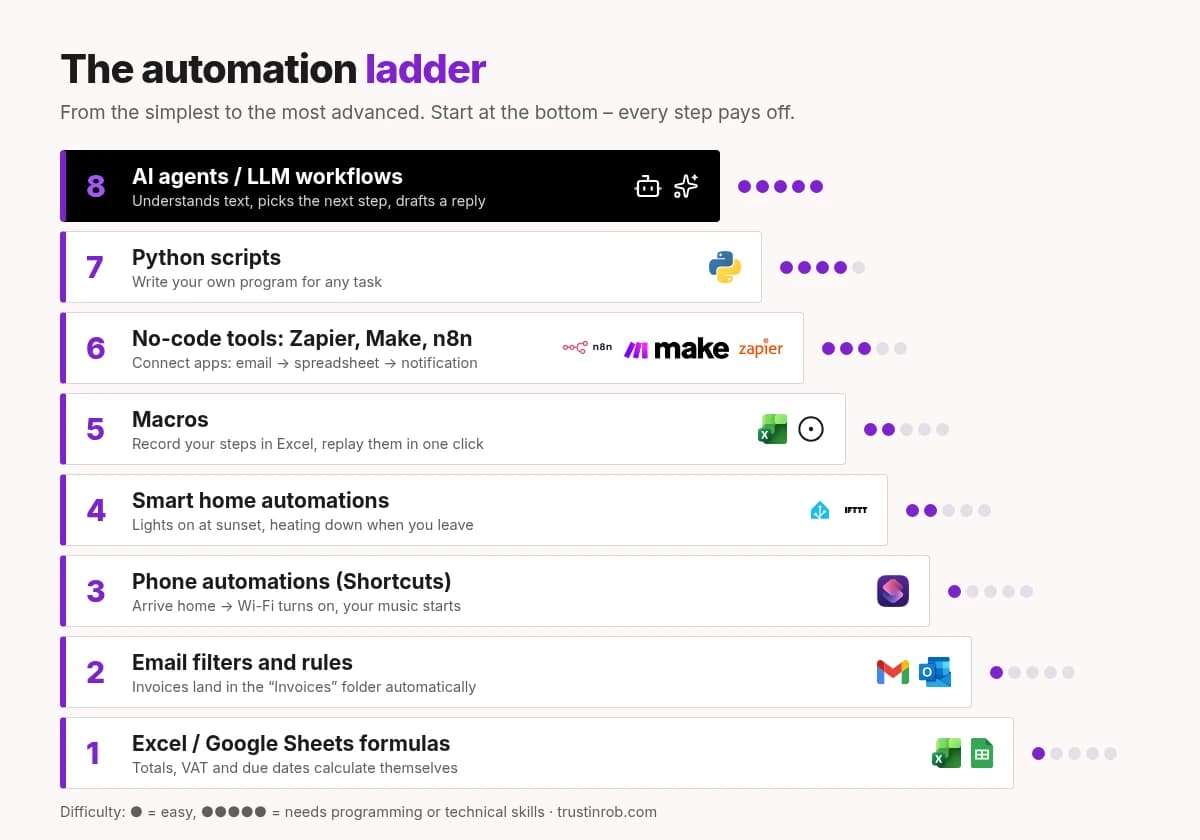
1. Excel and Google Sheets formulas
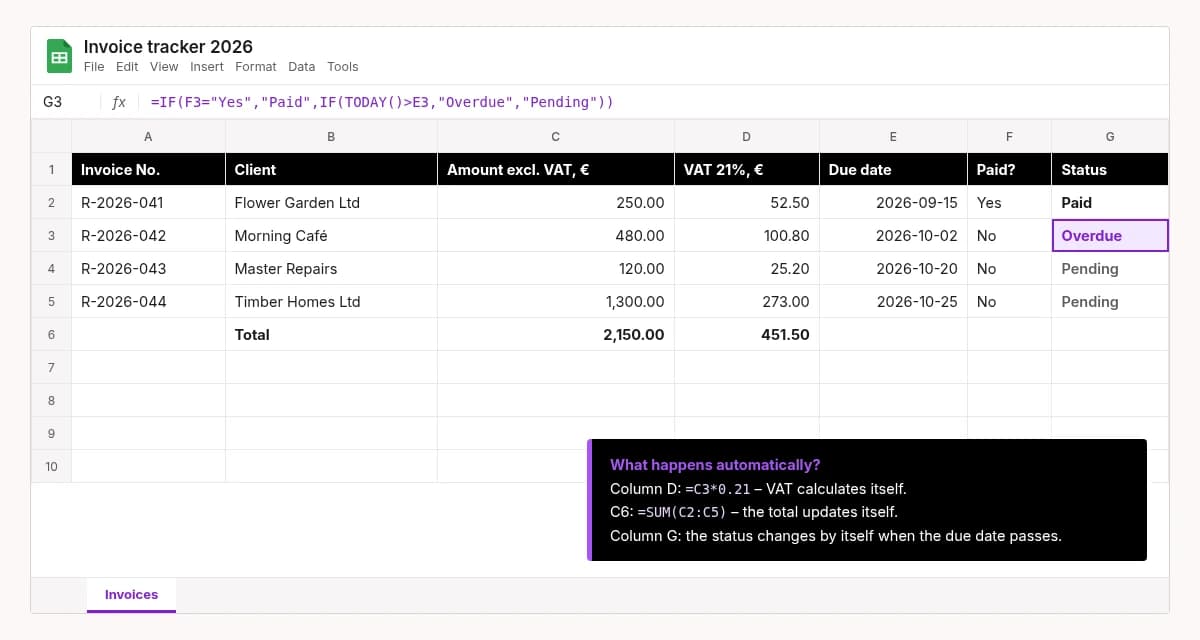
What it is: A formula is a small instruction in a spreadsheet cell that calculates the result by itself. Autofill lets you copy a formula to hundreds of rows with one drag of the mouse.
Example: You type the amount without VAT, and the next column calculates the VAT and the total by itself. Another formula shows “Overdue” on its own when an invoice’s due date has passed.
Who it suits: anyone who works with spreadsheets. Difficulty: easy.
2. Email filters and rules
What it is: In Gmail, Outlook and other email services you can set rules for what happens to incoming messages.
Example: Every email with the word “invoice” in the subject goes straight into the “Invoices” folder. Newsletters go straight to “Read later”.
Who it suits: anyone with an overflowing inbox. Difficulty: easy.
3. Phone automations
What it is: iPhones have the Shortcuts app. Android phones have similar features, such as “Modes and Routines” on Samsung. Your phone carries out actions by itself when something happens.
Example: When you get home, your phone turns on Wi-Fi and starts playing your music. Every evening at 22:00 it switches to silent mode by itself.
Who it suits: everyday convenience. Difficulty: easy.
4. Smart home automations
What it is: A smart home is your home devices – lights, heating, sockets, sensors – working by rules. They are controlled by apps such as Google Home, Apple Home or Home Assistant. With IFTTT (“If This Then That”) you can connect home devices to other services.
Example: At sunset the living room lights switch on by themselves. When everyone has left the house, the heating turns down – and you get a message on your phone if someone opens the door.
Who it suits: homes and small spaces where you want more comfort and fewer forgotten things. Difficulty: easy to medium.
5. Macros
What it is: A macro is a recorded series of actions. You do the steps once, the program (for example, Excel) “records” them and then replays them with one click.
Example: Every Monday you tidy up a report: delete extra columns, colour the headers, sort by date. A macro does it in a few seconds.
Who it suits: office workers, accountants. Difficulty: easy to medium.
6. No-code tools: Zapier, Make, n8n
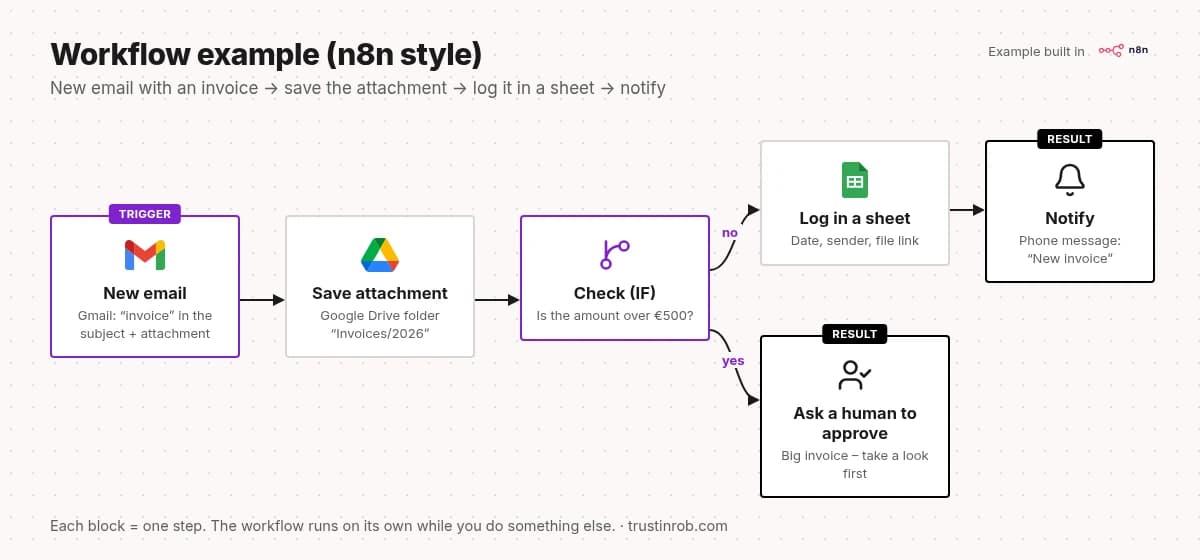
What it is: “No-code” means “without programming”. These tools connect different apps, and you do it by putting blocks together on the screen. Every workflow starts with a trigger – the event that sets it off. Then come the steps.
Example: An email with an invoice arrives → the attachment is saved to Google Drive → the details are logged in a spreadsheet → you get a message on your phone.
Who it suits: small businesses that use several apps and want them to “talk” to each other. Difficulty: medium.
Zapier and Make run in the cloud (that is, on those companies’ servers). n8n can be used in the cloud or installed on your own server. Then your data stays with you.
7. Python scripts
What it is: Python is a programming language considered one of the easiest to learn. A script is a small program that does one specific job.
Example: Every morning a script checks a supplier’s price file with hundreds of products and sends you a list of the ones whose price has changed.
Who it suits: people who need full control or something the ready-made tools can’t do. Difficulty: hard – you need to learn or get help.
8. AI agents and LLM workflows
What it is: An LLM (large language model) is a type of AI that understands and writes text – for example, ChatGPT or Gemini. An AI agent is a program that doesn’t just answer, but also decides the next step by itself and uses other tools, such as your calendar or email.
Example: A client writes: “Can I book for 15:00 tomorrow?” The agent reads the message, checks the calendar and drafts a reply with the free time slots. You just approve and send it.
Who it suits: work with lots of text and varied questions. Difficulty: hard – it needs careful setup and supervision.
And what is RPA? Robotic process automation – software “robots” that imitate what a person does on a computer: open programs, copy data, fill in forms. It’s mostly used by larger companies whose older systems don’t connect easily to other apps.
Where is automation used most often?
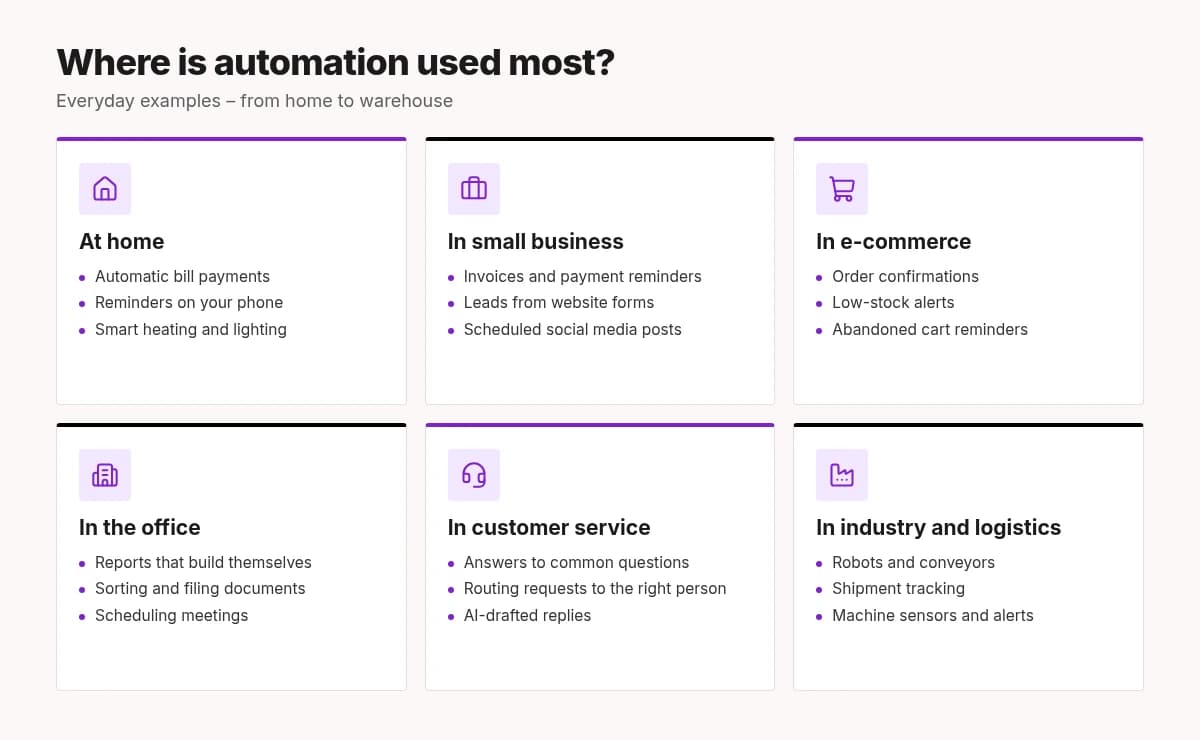
At home and in daily life. Automatic bill payments at the bank. Calendar reminders. Smart thermostats that adjust the temperature themselves. Phone photos that back themselves up to the cloud.
In small business. This is often where the gain is biggest, because one person does lots of different jobs:
- Invoices: an invoice is created when the work is done, and if it isn’t paid, the client gets a reminder automatically.
- Leads: when someone fills in a form on your website, the details land in a spreadsheet and you get notified straight away.
- Client replies: an automatic “Thanks, we got your message! We’ll reply within one business day.” Ready-made answers for the most common questions.
- Social media: you prepare posts once a week, and they publish themselves on schedule.
- Reports: every Monday a summary of last week’s sales arrives in your inbox.
In e-commerce. Order confirmations, delivery status updates, an alert when a product runs low in stock, a reminder to customers about an abandoned shopping cart.
In the office and administration. Sorting documents, contracts from templates, scheduling meetings, holiday requests.
In industry and logistics. Here automation is old news: robots, conveyor belts, sensors that warn about equipment faults, shipment tracking.
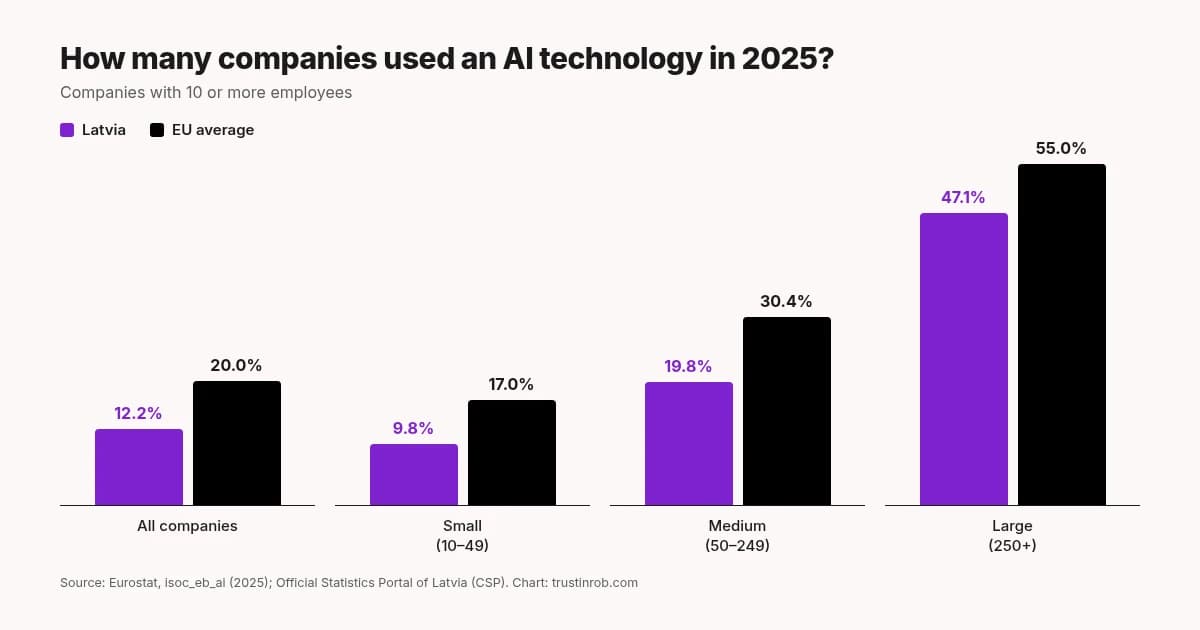
What about Latvia? According to the Official Statistics Portal of Latvia (CSP), in 2025, 12.2% of Latvian companies with 10 or more employees used at least one AI solution. The EU average was 20%. Among companies that had considered AI but not yet adopted it, 63.2% named a lack of expertise as the most common reason.
A look at the future
AI agents. This is what everyone is talking about right now. The analyst firm Gartner predicts that by 2028, 33% of enterprise software will include AI agents (up from less than 1% in 2024), and at least 15% of day-to-day work decisions will be made by them autonomously. But Gartner also warns that more than 40% of such projects could be cancelled by the end of 2027 because of rising costs, unclear value or weak risk controls. So the potential is big – and so is the hype.
Hyperautomation. This word describes an approach where a company automates as many processes as possible by combining different tools: AI, RPA, no-code platforms and more. Put simply: not one robot, but a whole team of tools working together.
What will change for people and jobs? The worries are understandable. The World Economic Forum’s “Future of Jobs Report 2025” estimates that by 2030, 170 million new jobs will be created worldwide and 92 million will disappear. That’s a net gain of 78 million. The same report says that out of every 100 workers, 59 will need to learn new skills or retrain by 2030.
McKinsey estimates that by 2030 about 27% of current working hours in Europe could be automated. That doesn’t mean as many people will lose their jobs. More often it’s tasks that change, not whole professions that vanish. The biggest changes will hit office support and customer service roles.
My view is simple: automation takes away the boring part. An accountant who no longer has to retype receipts can spend more time advising clients. But change doesn’t happen by itself. The best protection is to learn to use these tools yourself.
Where to start? 5 simple steps
- Make a list. For one week, write down the tasks that repeat and how long they take.
- Pick one small task. Frequent, boring and with clear rules. For example, saving all invoices into one folder.
- Start at the bottom step. Maybe an email filter or a single formula is all you need.
- Try it on a small scale. Check for a few weeks that the result is correct.
- Measure the gain. How many minutes a week did you save? If it works, move on to the next task.
A quick calculation for motivation: if a task takes 10 minutes a day, then over roughly 250 working days that’s more than 40 hours a year. A whole working week.
Common mistakes and risks
- Automating chaos. If a process is messy, automation will only make the mess faster. Tidy it up first, then automate.
- Starting with a project that’s too big. A big project takes a long time to pay off and easily stalls halfway. A small one gives results within a week.
- “Set it and forget it.” Apps change, connections expire, and a workflow can quietly stop. Set up an alert for when something fails.
- Blind trust in AI. AI can make mistakes and even make up facts. For important things – like replies to clients or payments – keep a human check.
- Privacy and security. Clients’ names, emails and phone numbers are personal data, and the GDPR (the EU General Data Protection Regulation) applies to them. Think about where data is stored and who has access. Use two-factor login and don’t give tools more access than they need.
- Hidden costs. Subscriptions often get pricier as usage grows. Maintenance takes time too.
- Only one person knows how it works. Write down briefly what each workflow does and where to change it.
Frequently asked questions
Do I need to know how to code?
No. Formulas, email filters, phone automations and no-code tools are made for people without programming skills. Coding only helps on the top steps.
How much does it cost?
Formulas, email filters and phone automations are usually free, because they’re already in your apps. Zapier and Make offer free plans with limits; for more volume you pay a monthly subscription. n8n can be installed on your own server, so you mainly pay for the server. Prices change, so check the tools’ websites for current information.
Will automation take my job?
Most of the time it takes over individual tasks, not the whole job. People who learn to use automation usually gain more time for more important work.
Will my data be safe?
It depends on the tools and settings you choose. Pick trustworthy tools, give only the access that’s needed and, if you handle client data, follow the GDPR.
What’s the difference between automation and AI?
Automation follows rules: “if X, then Y”. AI can understand text or images and make simple decisions. They’re often used together: automation is the “hands”, AI is the “head”.
To wrap up
Automation isn’t just for big companies. It starts with one formula, one email filter or one small workflow. Pick one repetitive task this week and try handing it over to a computer.
And if you’d like a hand – here we are! TrustInRob helps automate almost anything: from a simple Excel sheet that adds up your invoices by itself to really complex systems where lots of apps, n8n workflows and AI agents work together. A small task or a big project – we enjoy both.
You don’t need to know what it’s called or which tool you need. Just tell us what you’re tired of doing by hand. We’ll figure out the rest together – in plain language, without unnecessary tech talk.
Drop us a line via the contact form: trustinrob.com/en/contact – and let the robots do the work while you enjoy your coffee.